Description
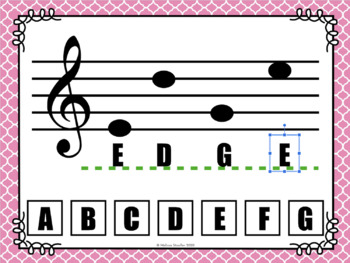
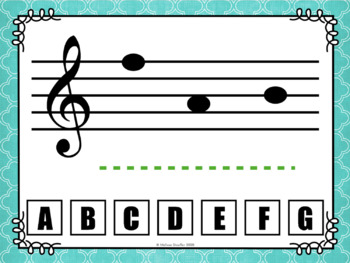
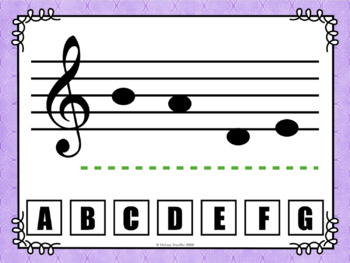
This Google Slides activity has 48 words spelled by treble clef note names. Perfect for students who are learning note names in general music, band, choir, or in private lessons.
Drag and drop text boxes to write the word. (Three provided for each letter.)
Great for distance learning, or as an in-class activity.
Full list of words included in accompanying Google sheet.
VIP Points
I've created a simple point system for giving back to loyal customers!
- For every $1 (US dollar) you spend, you earn 1 point!
- 20 points can be redeemed for $1 (US dollar) on a future purchase!
- When you leave feedback (review), you get 5 points!
- VIP Points can be viewed under My Account.
This means that you effectively get 5% back on everything you buy, plus extra points for feedback. Points are valid for one year and can be used for anything in the store!
Note: Point award system is subject to change. View full terms here.
Only logged in customers who have purchased this product may leave a review.



Cece L. –
Thanks so much
Sarah D. –
I feel like this is a “beginning stage” product for a drag-and-drop…. when moving the text boxes to the lines, they just stay there. There is no bounce back if they are the incorrect letter, which might be fine for assessment but I need my students to be able to self-assess since they are learning asynchronously. Also, dragging the text boxes will be difficult for my students on tablets or iPads because you have to specifically click on the edges of the boxes to drag, not just click the letter itself. I generally really love Mrs. Stouffer’s resources but this was just kind of a miss for me personally.
Shelley –
Hi Sarah,
I’m sorry this did not meet your expectations. Unfortunately all the problems that you found with this are things that I can’t do because of the limitations of Google Slides. Google Slides do not allow for self-checking or for the clicking directly on the letter. I’ve spent a bit of time looking since your review to see if I could update and neither of these things are possible with Google Slides.
Kelsey S. –
I normally use whiteboards and markers with my students, but with COVID we couldn’t do that. This was a wonderful alternative. The kids were able to work at their own speed with these and had a lot of fun!
Musical Me –
Good stuff. Thanks
Teach. Sing. Inspire. –
Such an amazing and useful activity for my virtual students to use to practice their note names!
sheila J B. –
My students have loved this. The classroom teacher loves this, because it is helping students to work on their spelling!! I love this because it’s a new way for my studeents to help read notes, thank you for your work!!
Alycia A. –
Perfect for my middle school choir students
Song and Supplies –
This resource was exactly what I was looking for! Thank you so much!
Julie P. –
WAs perfect for my students working on their notes!
Carly Z. –
This is a great tool for my band classes. Thank you!
Rikki C. –
Love this product. Thank you!
Elisabeth L. –
Great resource for distance learning!
Priscilla M. –
Great resource that I used with my virtual students. I assigned it as an assessment activity and it was very straightforward for students to complete.
David S. –
Good resource that I was able to use for an assessment with my virtual middle school students.
Stephanie C. –
This was a great resource for reinforcement. Thank you!
Sarah Hashem –
Great note reading activity for my students.
They were engaged, attentive and focused!